2024 NBA Finals Chipotle Bot
It was once again time for another NBA Final Series. Being in the post-grad phase of my life, I had not realized how soon the matches were. I was also not as interested as the teams were not of my particular interest. But on June 4th, Chipotle once again released an announcement via Twitter. A very familiar announcement if you have read my earlier posts. Welcome to Round 2, or the second year of my attempt at getting free burritos from Chipotle’s NBA Final Special. Or should I say, the Chipotle “Men’s Basketball Championship Series Special”.

Due to the story of Twitter becoming X, last year’s program that I created was now obsolete as the API was no longer existing the way it was. So I needed a new way to acquire the newest tweets from an account. X’s API plan started at $100 a month and I was sure not going to pay that for my little side project.
During the second year of my attempt at this, I was also embraced with other tools and other experiences. That being learning another language for programming. So this year I was contemplating writing the bot in a completely different language. That being Golang, given that I worked with it for my senior project (POST SOON I PROMISE). I was excited to work with this once again, but in a different context. But not only Golang, but I was also going to rely once again on the helpful npm package for the google messages web client. I was also going to try a new javascript runtime, that being Bun[1], as it aims to be faster than node at both starting and running your code.
There was only one issue. I had broken my phone the week before and the new one would not arrive until after the first game. So I could choose to work on the Javascript code submission code without any way to test the login process once again, or work on the scraping of tweets ,the old school way I figured, using Golang. So that’s what I did.
Golang Web Scraping
I began by searching the internet for libraries or packages that Go has to offer regarding web scraping. After a while, I found the Rod Library , which is similar to Puppeteer and Selenium. With Rod, I can spawn browsers and control each of them for the automation I needed. This was necessary because Twitter has not changed much of their policies and does not allow people who are not logged in to view tweets. Having the browser would help me keep the login session for a longer time since I needed to be watching all of the tweets. Another thing that Rod offers is proxy support, which I will touch on more later.
However, as it turns out, I didn’t get much time to code on this side project, and Game 1 had started. So instead of programming, I decided to watch the game and camp on X, knowing I had no chance of manually scoring a code. As expected (unexpectedly?), Chipotle decided to drop image codes once again. Reminiscing on my challenges due to it and my use of Google Cloud, I now, this time around, was equipped with a new tool in the bag that I did not have back then, or at least made use of: AI.
Using OpenAI’s GPT-4o, I can send an image link and ask it to tell me, for example, what code should I text.
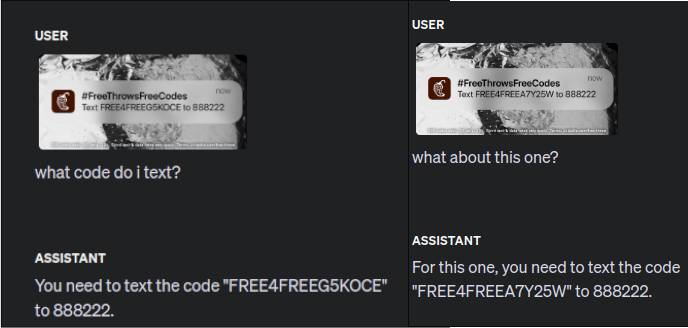
As you can see, OpenAI’s Playground mode lets you analyze the performance of these models before using them programmatically via the API. Here, I decided to send the URL of the Twitter image and see what happens. Another thing to note here is that the regex pattern for parsing out the code through the text was also the same. So in the event that Chipotle does make an X post with raw text, I should be good to go.
Communicating from Go to JavaScript, Unix Sockets!
Unlike last year, where everything ran in one program, this time I was handling two different processes. I needed a way for these two to communicate, mainly sending the code that gets parsed from the Go monitor to the Bun program that will submit the code. I didn’t need something higher-level like WebSockets since I knew I was running on the same machine, and having WebSockets would be too much overhead. TCP is still too much in my opinion, and I figured I could use something faster. That’s when I discovered Unix sockets.
Unix sockets are essentially a way for Unix-only machines to write and read from a more lower-level interface rather than a TCP network socket. My educated guess is that, since everything in linux is considered a file, and Unix Domain sockets rely on the filesystem as the basis for communication. This was the way I was going to feed codes for submission, ensuring near communication with the least delay possible, which is important.
The Importance of Proxies
I mentioned the use of proxies earlier, and there’s an important reason for this. Twitter itself will rate limit you if you refresh a specific web page far too much. I didn’t really get to measure that, but I just knew that after a while, I was going to get rate limited. So, I decided to make a lot of burner accounts whose sole purpose would be to log in and stay on a specific account, this being Chipotle.
As you might expect, Twitter can most likely detect if you are sending requests from the same IP address, so proxies were needed. I started by making three to four accounts to see, and as days went on and games started to progress, I ended up adding two or three more every time.
{
  "users": [
    {
      "username": "an_awesome_username",
      "password": "Password123"
    },
    {
      "username": "another_awesome_username",
      "password": "Password123"
    }
  ],
  "proxies": [
    "ip:port:user:pass",
    "ip:port:user:pass",
  ]
}
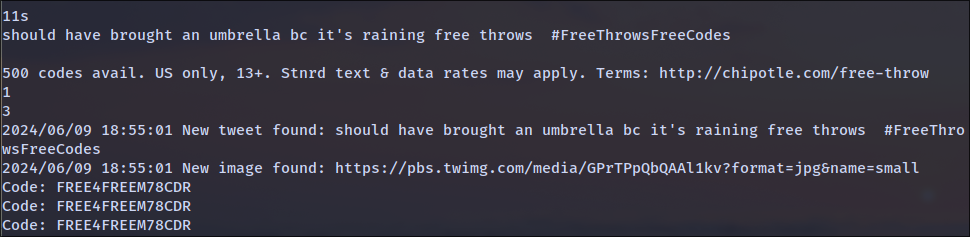
Once I implemented this, I was able to test both the scraping and the OCR processing, with a tweet from one of the burners:
Game 2 and System Overview

Here I will showcase the essential parts of the code that I believe are worth talking about. The first being how we get started initializing our login sessions. You can see I am parsing a JSON file which contains the account’s credentials and proxy list. For each proxy or for each account, a proxy is assigned which gets fed into the for loop below.
xLogins: = [] flow.Credentials {}
proxyList: = [] utils.Proxy {}
err = utils.ParseLogins("config.json", &xLogins, &proxyList)
if err != nil {
    log.Println("Error parsing logins:", err)
}
if len(xLogins) == 0 {
    log.Fatal("No monitor accounts found. Exiting.")
} else {
    log.Println("Found", len(xLogins), "accounts and", len(proxyList), "proxies")
}
go socket.Start() //Start UNIX socket server
go exec.Command("bash", "-c", "bun run ../sender/index.js").Run()
for index, logins: = range xLogins {
    go func(logins flow.Credentials) {
        //login logic and begin of monitor loop
    }(logins)
}
You can also see we start the socket server which the bun script right after will immediately connect to.
Next is the logic for checking if there was a new bio since this time around Chipotle wanted to be very sneaky and decided to play with the bots and change basically anything they could in their Twitter for a new code drop. Since I was parsing HTML, this was no issue. All I had to do was find the correct elements to monitor and there you go.
Here you can see if we find a new bio, we run it through the regex and if it’s a match then we can broadcast that message to the server which the bun script will be reading which you’ll see later.
go func() {
    if !utils.Contains(bios, bio) {
        log.Println("New bio found:", bio)
        bioMutex.Lock()
        bios = append(bios, bio) //perform bookkeeping to prevent duplicate submission
        bioMutex.Unlock()
        matches: = re.FindAllString(bio, -1)
        if matches == nil {
            log.Println("No match found")
        }
        if len(matches) > 1 {
            go socket.BroadcastMessages(matches[1]) // Send directly to bun for SMS
            log.Println("Code found!")
        }
        matches = re2.FindAllString(bio, -1)
        if matches == nil {
            log.Println("No match found for 'JUST CODE' pattern")
        } else {
            log.Println("Matches found for 'JUST CODE' pattern:", matches)
            if !utils.Contains(tweets, matches[0]) {
                go socket.BroadcastMessages(matches[0]) // Use the extracted match
            }
        }
    }
}()
The next part is checking for an image tweet. Here you can see that we search for the tweet: if it has an “img” tag and we do some extra filtering, once we find that there is an image then we send that off to OCR processing. I decided to do it three times since there might be the case that the model does not read the characters correctly, so I believe three was good to go and that’s that.
err = rod.Try(func() {
    imgs: = latestTweet.MustElements("img")
    for _, image: = range imgs {
      if !strings.Contains(image.MustProperty("src").Str(), "emoji") {
        if !utils.Contains(images, image.MustProperty("src").Str()) {
            log.Println("New image found:", image.MustProperty("src").Str())
            for i: = 0; i < 3; i++{ //send 3 times , in case 4o doesn't depict the code correctly
                go utils.OCRTweet(image.MustProperty("src").Str()) //send to gpt-4o for processing
            }
        }
      }
    }
})
if err != nil {
    log.Println(err)
}
The next part is now the JavaScript part and these two pieces of code are what handle the retrieval of the code sent from the Go project and submit it accordingly. This is similar to how I had it last year except it wasn’t from JavaScript to JavaScript, it was now through a Unix socket.
async function handleData(data, service) {
  const messages = data.toString().split('\n').filter(msg => msg.trim() !== '');
  for (const msg of messages) {
    const response = JSON.parse(msg);
    console.log('Received from server:', response.text);
    // Example action on received message
    await service.sendMessage(response.text);
    console.log('Done!');
  }
}

client.on('authenticated', async (service) => {
  console.log('Preloading message...');
  await service.preloadMessageChannel('888222');
  console.log('Done!');

  // Listen for data from the server
  sockClient.on('data', (data) => {
    handleData(data, service).catch(console.error);
  });
});
With all of this out of the way, we can now get into the fun stuff: Actually hitting codes.
The first time I hit, I was actually not on my computer. I was out doing some gardening when I decided to check back on my phone and saw that I had submitted a code. Check it out:

And this wasn’t the only one. Below, I have more screenshots of me hitting. And luckily this time around, I was actually able to record myself or record the program submitting a code and winning it.
Video
Seeing this work was a relief and showed that my project setup was effective. Watching the Twitter monitor work after making all those accounts really paid off.
Struggles and Things to Note
As I mentioned before, I had made multiple accounts. And while this decreases the likelihood of being rate limited at a given time, it also increases your memory usage. As we all know, Chrome likes to take a lot of memory so I had to make sure that I wasn’t saturating my entire memory just running browsers. Apart from that, one can see how this can be sort of an issue when running on something with less resources, like a server.
Another thing was the error handling, which is normally complex as I would consider the operations we’re doing here to be more or less asynchronous. Anything can happen when you fetch HTML content from a web browser. You might have timeouts. You might have parsing errors. So you have to account for all of that. As a simple catch-all, I decided to make a timeout of around five to ten seconds if I was indeed rate limited or if there was an error with the response in any way.
But overall, I really enjoyed the process of creating both the Go and the Bund JavaScript projects and I feel it was a success.
Ending Remarks
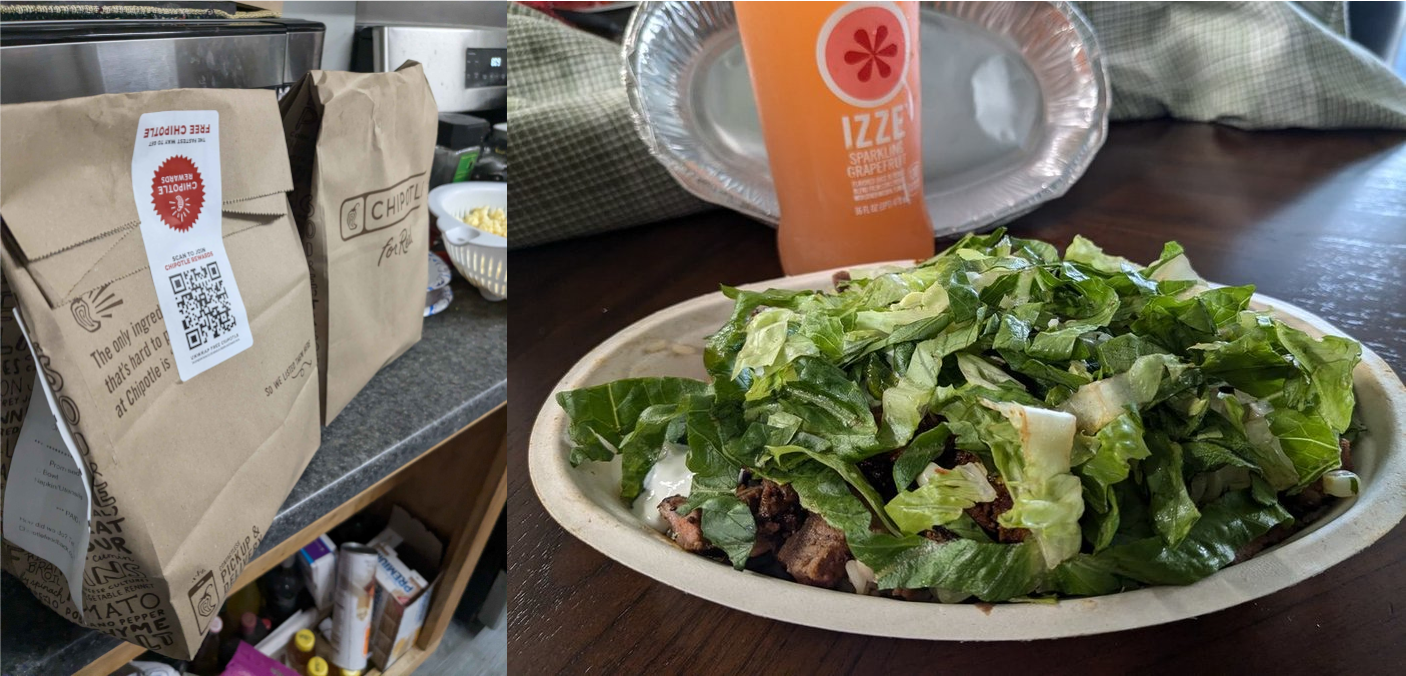
Well, that does it again for this year. It was a very fun time once again. As you can see, I was able to get various hits and with low effort, for the most part. I was happy to have used Go and goroutines as I believe they helped me a lot in making sure I can get the vision come to life. Below is a picture of me enjoying one of my precious burrito bowls.
See you next year!
References
2 - Bun, a new Javascript Runtime ↩
3 - Rod Library ↩
4 - GPT-4o response in Playground Chat ↩
5 - GPT-4o in Action ↩
6 - Flowchart of General Overview ↩
7 - First Hit! ↩
8 - Video recording of Live Code Submission ↩
9 - Free Chipotle Meal ↩