2023 NBA Finals Chipotle SMS Bot
Before I begin, I guess something that I forgot to mention in my first post was my involvement in the Reselling Space, particularly in the Sneaker Reselling scene. In the spring of 2021, after failing to get good at stock trading (I only bought DogeCoin), I decided to dive into the scalper scene that was happening to GPU’s and consoles, specifically the PS5. Maybe I’ll make an entire post about it, but for now the takeaway is that I got accustomed to finding ways to be the first at something (Buying the GPU, Redeeming the code, etc). When I think about it, it all comes back full circle to my FIFA web app script I made almost 10 years ago. There is something exhilarating about knowing that you were the first or one of the first of many to succeed.
Back in May of 2023, before the NBA Finals started, I saw a post on twitter from Chipotle, with a special announcement:
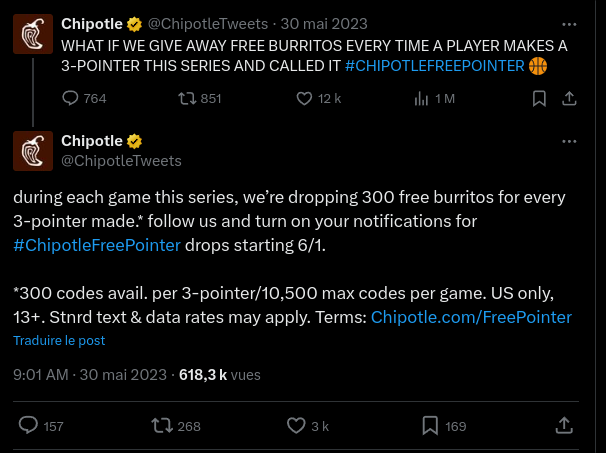
Given that I was not actively working on any project at the time, combined with the fact that I love Chipotle, I figured; why not try to score some codes? According to AP News, the 2023 NBA Season was witness to an average of 24.7 3-Pointers per game, which for the record was down just a bit from last season’s average of 24.9. [2]
10,500 codes per game, I am surely going to get one per game, I thought. This probability (delusion?) was enough for me to venture into what it would take to automate the retrieval and submission of these codes.
The Game Plan
Sending Codes
Relying on my experience in the scalping scene, specifically the experience gained from botting; I knew that the end goal would be to have some sort of system for piping codes to SMS for sending. The first thing I tried was going onto Google Voice and sending a test message to the Chipotle SMS number (888-222), to see if they had an automated response. Turns out that Chipotle does well in filtering out numbers registered with VoIP (Voice over Internet Protocol) services, so I was not receiving anything compared to my main number. It seemed like a bummer at first, but it did end up being an early stop to what could have been a rabbit hole of no success; using things like API’s to request VoIP numbers to send, paying for message sent and received, etc. There had to be another way.
I use an Android, so maybe there is a way to send messages through either an API or a web client? Fortunately there is! Google’s Messages for Web allows you to both read and send text messages through a browser, just by Logging into your respective Gmail account (link). I most likely had used this sometime before but it did not come into mind until now. I would have to use a browser automation tool to hook into the UI of the page to automate the sending. Nothing too hard. During that summer I had been itching to work with NodeJS, and this seemed like the perfect way to make that happen. The only thing close to a browser automation library I used in the past has been Python’s Selenium library. With Node, you have the Puppeteer library. So I got to work.
But it wasn’t much work I had to do for this part. Doing a quick search on Google led me to a Github Repo that had basically created a NPM package for my purposes!
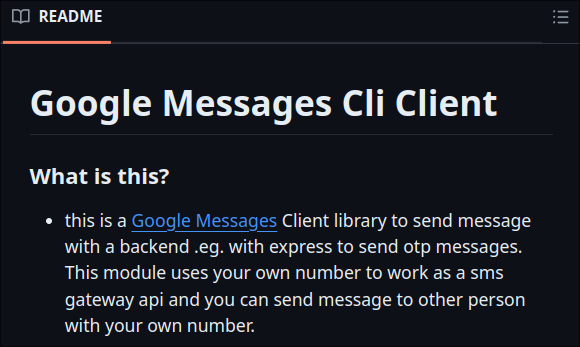
This library solved that end of the entire system. From the brief testing that I ran, it seemed to flawlessly take care of the login process, saving a QR code to the running directory for scanning with my phone. Sending a test message was also working, so I left it at that and decided to pivot towards the other part of this “burrito generator”: Tweet Monitoring.
Code Monitoring via Twitter (X?)
Programmatically monitoring for new Tweets could essentially be done in 2 ways:
- Web Scraping: I could probably make some rough node script that would visit a particular X account and refresh in intervals for new tweets. It is definitely more resource intensive.
- API Assisted Requests: Making a Developer Account with Twitter, I can have access to endpoints that allow me to perform much quicker actions to retrieve X posts. The free tier comes with rate limits, but would allow me to parse responses, instead of HTML, which can be a pain.
In the end, I went the API route. For this I also found an NPM module that wrapped all the endpoints in nice-to-use methods.
const dotenv = require("dotenv");
const { TwitterClient } = require("twitter-api-client");

dotenv.config();

const client = new TwitterClient({
  apiKey: process.env.API_KEY,
  apiSecret: process.env.API_SECRET_KEY,
  accessToken: process.env.ACCESS_TOKEN,
  accessTokenSecret: process.env.ACCESS_TOKEN_SECRET,
  disableCache: true,
});

module.exports = {
  client,
};
Using the TwitterClient instance, I would be able to perform Authenticated API requests, retrieve the post content, scan for codes…and pass that to the messages client. Everything seems to be progressing as planned.
Code Parsing
I remember that I was two days out of the first NBA Finals match at this point, So I still had time to smooth the edges. One thing I still needed to do was find a way to extract the code and only the code to send to the client. I could have done some weird string operations to find it using keywords, but it would add extra complexity that was not needed. That is when I decided to try out Regular Expressions or regex; Think of it as a filter that your string can go through, and at the end, you have exactly what you want, if it exists in the input string. Now I just needed to see if a pattern exists within Chipotle’s tweets.
Looking at past posts, it seems that they indeed do follow a pattern. We would now have to bet and hope that they stick to this pattern for this next promotion.

The pattern we’re going to translate into regex is, in natural language at least, resulting in the code is:
- “Take whatever string is in the phrase ‘text [CODE HERE] to 888222”
Since I was definitely not good at regex, I had a back and forth with ChatGPT to get it just right, otherwise, I was going to break my head. I also wanted to make sure the pattern could cover some edge cases, such as:
- account for the word “text” or “texting”
- account for either the number “888222” or “888-222”
After being an amazing prompt engineer, the resulting pattern was the following:
const codePattern = /text(?:ing)?\s+([\w!@#$%^&*()]+)\s+to\s+888(?:-)?222/i;
Looking at it now, it seems straight-forward, apart from the symbols in between the “text” and “to” parts. At this point, I was confident and ready to push through to get a finished prototype. I decided to also add Discord Webhook support to ping every time a new Chipotle tweet with a code appeared. This way there was no need for any manual monitoring. All I had to do was watch the game on TV, in a perfect world of course.
System Overview
This is essentially how I had envisioned the system would work:
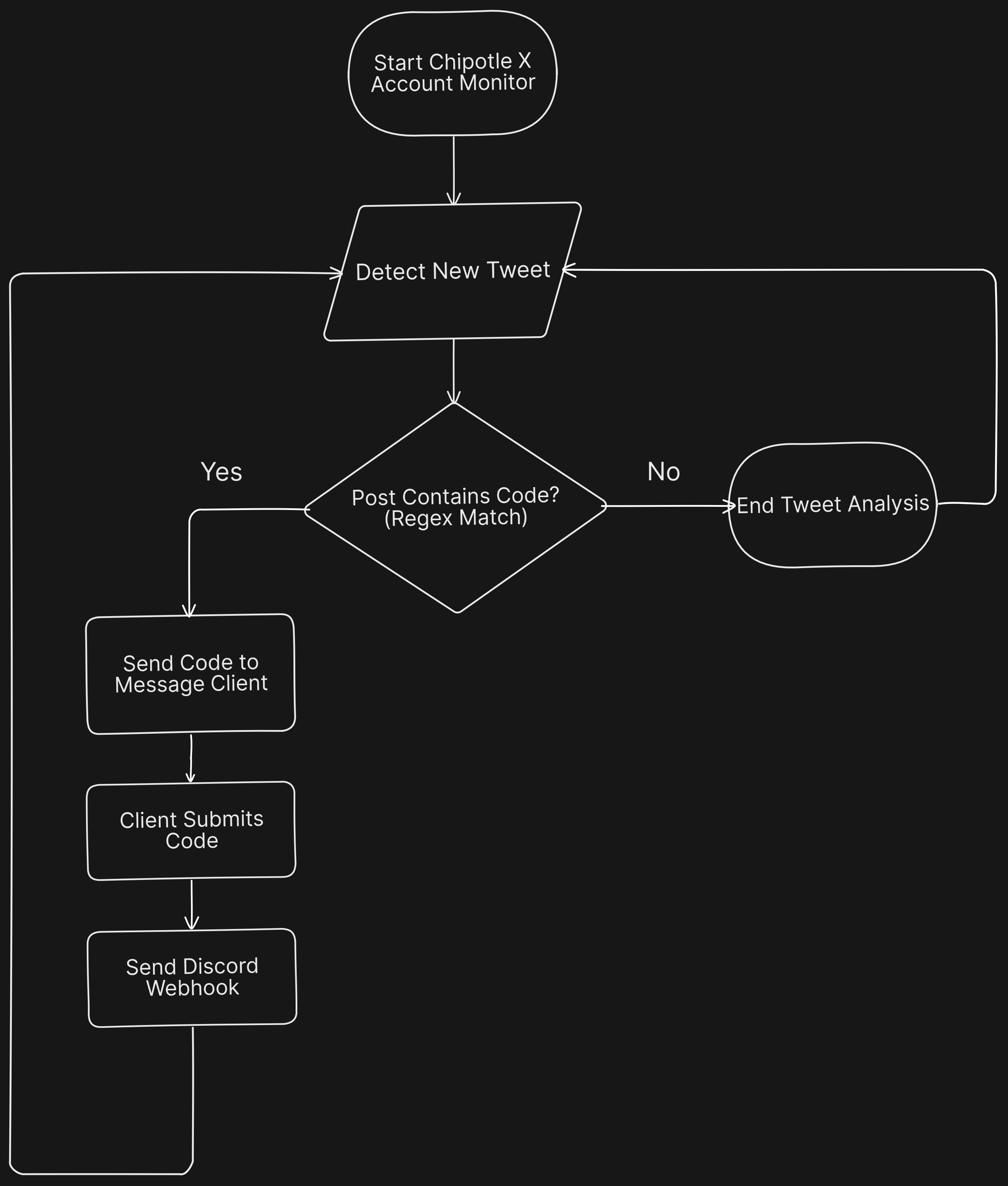
I did not include things like error handling in this chart; this would include things like inevitable rate limits and other events that can occur when dealing with http requests. A simple way to deal with these is to just add a retry delay, allowing you to continue with making requests after a brief pause.
Game Day (Game 1)
And just like that, I was ready to test my creation. I had made some burner Twitter accounts to make some testing, and I was pretty confident I would be able to have a decent shot at a free burrito.
The day finally came, June 1st of 2023. The Game started at 5:30PM local time and I was ready; ready for any team to score the first 3 pointer. I was telling my friends on Discord of how it was the final countdown to at last see my creation succeed.
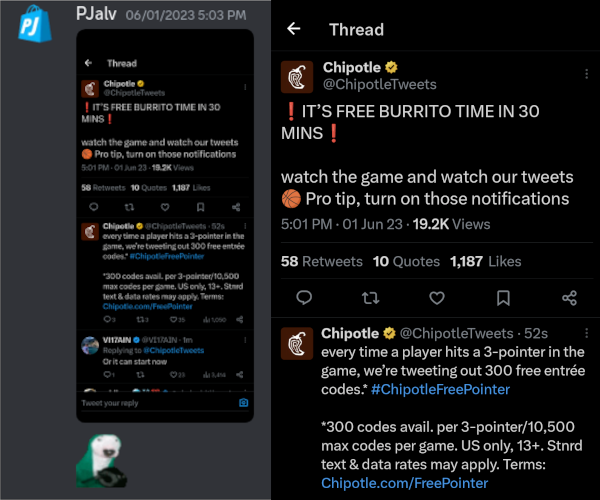
As Mark Rober says in his famous Glitter Bomb Series “and we didnt have to wait long…”. Shortly after the game started, the first three pointer was made. [5]
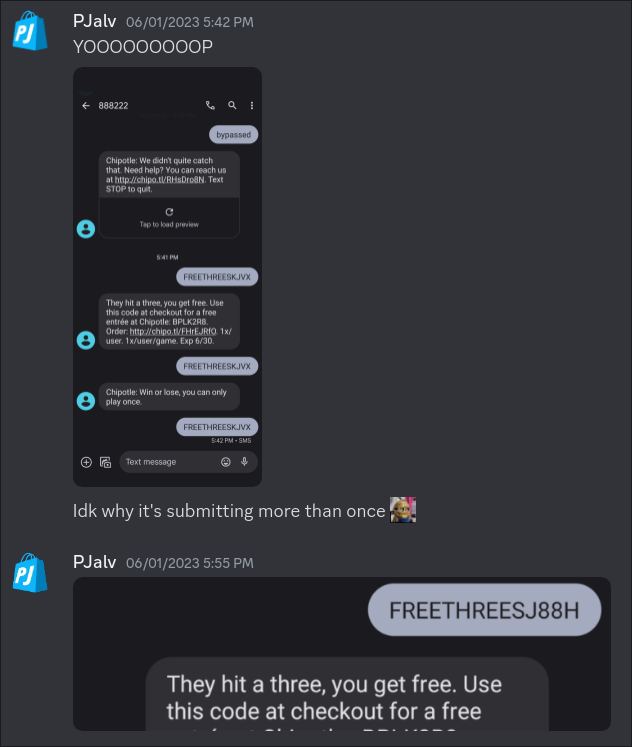
At this point I was more than happy; seeing my creation come to fruition and rewarding me was such a satisfying feeling. It felt better than snagging 10 PS5s in the matter of seconds from Amazon. I didn’t pay or buy software; I made it my own. Shortly after, more 3-pointer’s began arriving, and as I checked, I continually scored. More Codes, I thought. I did not care to check, and I let my inbox flood with these success messages. It wasn’t until a few minutes into the 1st quarter (probably a commercial break), when I sat down to analyze them.
Unfortunately, every time I would “hit” from a code, I would get the success message, but it would be for the same code. :( To cope, I told myself that every time I would get a success message, it had to mean that I was in the first X redemptions of the tweet’s code. I think this to be true, because when I wouldn’t hit, I would get a “you missed it” response.
Overall, I was very happy of the performance. I remember I was running the program on a server I was using at the time for sneaker botting, in hopes of having low ping times to the Twitter servers. GAME 1: SUCCESS!!
Game 2 - OCR
In the NBA Finals, games are only 1 or 2 days apart. So like the players, I had a brief period of analysis and preparation. If I did any code changes, they were minor and didn’t affect the overall functionality of the system. At this point I should share a snippet of the main code.
client.on('authenticated', async (service) => {
    await service.preloadMessageChannel(process.env.TARGET_NUMBER);
    console.log('Done Preloading!');
    discordBotClient.login(process.env.BOT_TOKEN);
    let sentCodes = []
    discordBotClient.once("ready", async () => {
        // Define an asynchronous loop function
        const checkPost = async () => {
            let sentCodes = []
            while (true) {
                const codes = await startMonitor(discordBotClient, config);
                perf.start();
                console.log("Received codes:", codes);
                if (!sentCodes.includes(codes)) {
                    await service.sendMessage(codes.toString());
                    const results = perf.stop();
                    console.log(results.time);  // in milliseconds
                    sentCodes.push(codes);
                }
            }
        };
        // Start the asynchronous loop
        checkPost();
    });
});
I want to emphasize the importance of two methods I used: service.preloadMessageChannel & service.sendMessage.
The package I had used for making and sending text messages via the Messages for Web Interface could have used an improvement. The package in its initial state only included the method sendMessage. This would create a new message channel in the user interface, type the destination number, type a message and send it. I was only using one number, so seeing the program always load a new channel was not efficient, and if there were network issues where the page would delay loading elements, then I could potentially risk missing out on codes.
So diving into the source code of the package, I set out to separate and include the two methods. That way, I can easily preload the page, leave the browser on the text-box as soon as a code is ready to send, simply type and send away.
async sendMessage(text: string) {
        let msgInput = await this.page.$x('/html/body/mw-app/mw-bootstrap/div/........');
        console.log('Message input hooked');
        if (msgInput.length) {
            console.log('Typing message...');
            await msgInput[0].type(text);
            await this.page.keyboard.press('Enter');
            console.log('Message sent');
        } else {
            console.warn('Message input not found');
            await this.page.reload();
            console.warn('Retrying...');
            await this.sendMessage(text);
        }
        return
    }
That wasn’t the only refactoring I had to do though. Once Game 2 was around I was met with yet another Challenge: Image Posts. Technically I had already seen this. In Game 1, they had posted a picture, and I thought “oh nice one Chipotle”, thinking it was only a One time thing. Which is was not.
I guess at this point Chipotle noticed that there were a lot of codes being redeemed in mere seconds after posting, to which this was an attempt at deterring. One thing I learned quickly in the Sneaker Botting world is that there is a cat and mouse game. A certain retailer might change the checkout flow of their website to which Bot Devs had not accounted for, and they must quickly push an update or else their user base might be left out of scoring an item. It could also be the reverse case. The Bot Devs can find an exploit in the website that lets them checkout quicker then even other bots, without the website’s engineers realizing how. Below we can see that even in an Image Post, they still use the phrase that will comply with our regex filter. How nice!
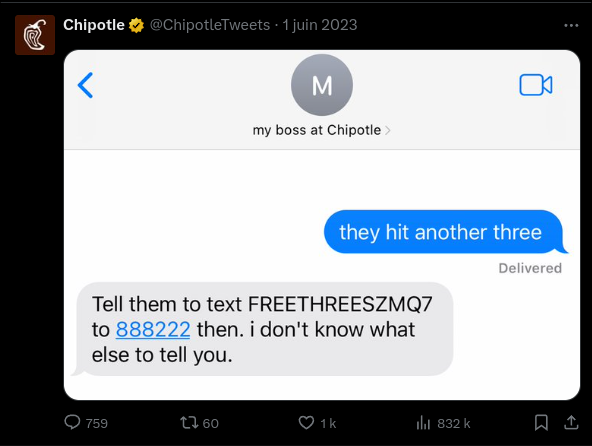
Regardless, I was more then ready to face this hurdle. Having knowledge of what it would take for reading the text from the images, I was going to use Google Cloud Vision to achieve this. Once I made an developer account, I was given $300 in free credit; more than enough. Here was my implementation of the OCR for code retrieval.
...
if (tweet.extended_entities && tweet.extended_entities.media) {
    console.log("Image detected...");
    // I don't remember changing this, IMAGEURLHERE is some placeholder. Unfortunately Twitter API is no longer :/
    const OCR_Text = await solveOCR(process.env.DISCORD_CHANNEL_DEST, IMAGEURLHERE);
    const match = OCR_Text.match(codePattern)
    code = match ? match[1] : null;
    console.log("Code", code);
    await sendImageEmbed(channel, tweet);
}
...
I cant recall at this point if I had testing during Game 2 or later on, but suffice to say, I was happy with the performance. The slight delay of calling the cloud API for a response was still faster then a Human, and unless someone was running an OCR model locally, I still had solid chances of scoring codes.
Game 3 and After
At this point in the Finals, I was really content with the performance. My chances for implementing anything that would be drastically better were low, and I was steadily getting codes, one per day. Everyone in my family here in the US uses an iPhone, and it seems Apple locks down the ability for desktop SMS capabilities to their devices. Not cool.
I decided to let some friends in Discord know that I could technically get them a code. All they would need is an Android, and the process would be quite simple. Someone reached out to me to try it out.

Looking back, I feel like I did a great job. I succeeded in the goal I had set, and I was also able to help others gain from my creation. However, from the developer perspective, I would have appreciated if I took the time to work on other housekeeping aspects of the project:
Git Repo: Throughout my journey learning about computers and programming, I had never used Git. Insane to think about. I would always have my projects in a folder and that was it. To be honest, there were times where I would completely rewrite files; but would regret it and now unless VSCode tracked anything, I was out of luck. A well maintained repo would have been an amazing addition, but that’s how I ended up working.
Media Documentation: Although I have shared a plethora of images, it would have been infinitely better if I just recorded small videos of myself talking or just small text entries of my progress; even just taking as many screenshots as possible. I believe this is a valuable part of the development process, not just for the developer but for others as well. All of these experiences will slowly fade from my memory, and it will become even harder to recall how I navigated my way to a working project.
Ending Remarks
Thanks for taking the time to read about my quest for free burritos. It was a redeeming experience, no pun intended. If nothing crazy happens this year, I expect Chipotle to host the same type of event for this year’s Final Series. To which I will be waiting.
You can visit the GitHub repo here: https://github.com/PJalv/chipbot-nba-finals-2023
References
1 - Chipotle Announcement on Twitter ↩
2 - “Inside the NBA numbers: A look at the season’s stats” - AP News ↩
3 - messages-web NPM package - SwapnilSoni1999 ↩
4 - Chipotle 2022 World Cup Post ↩
5 - “Car Thief Gets Instant Karma (the FINAL Glitterbomb 6.0)” - Mark Rober ↩